
Debian 13 “Trixie” ships with nftables as the default packet filtering framework, and the iptables package is no longer installed by default on fresh systems. If you upgraded from Bookworm and kept your old iptables-legacy rules around, they still work through the compatibility shim — until the day they silently stop matching traffic because something in your stack started writing to the native nft tables underneath them. That is the real reason the iptables to nftables Debian 13 migration matters: running both backends on the same host is a foot-gun, not a feature.
This guide walks through a clean cutover for a production Debian 13 server: auditing the rules you have now, translating them with iptables-restore-translate, reviewing the output (because the translator is not perfect), loading the result with nft -f, persisting it through nftables.service, and verifying the counters actually increment on real traffic before you reboot. I will also cover the two places the automatic translation tends to produce ugly or broken output — NAT rules that use --to-destination ranges, and rules that reference ipset — and how to rewrite them by hand.
Why the legacy backend is a trap on Trixie
On Debian 12 Bookworm, iptables was already a wrapper around iptables-nft, which translates classic iptables syntax into nftables rules stored under the ip family table named filter. That worked, but it hid a nasty detail: tools that write directly to nftables (firewalld, podman, docker’s newer releases, libvirt) create rules in their own tables, and the legacy iptables -L view does not show them. You end up with two parallel rule sets on the same kernel hooks and no single place to read the full policy.
Debian 13 takes this a step further. The iptables binary is still available from the archive, but it is no longer pulled in by default, and the release notes recommend migrating to native nftables rules. The Debian wiki nftables page is the canonical reference for the Debian-specific service unit and the location of the persistent ruleset file. Read it before you start — it is short and it will save you an argument with systemd later.
The practical consequence is simple. If you have a host running Docker and a handwritten iptables ruleset, on Trixie those two are now guaranteed to live in different nftables tables. The kernel evaluates all of them in hook-priority order, which means a DROP in your filter table can shadow a Docker DNAT, or vice versa, depending on the priorities involved. Converting everything to native nft syntax puts the whole policy in one place where you can actually reason about it.
Audit what you actually have before touching anything
The first rule of a firewall migration is that the rules you think are loaded are not always the rules that are loaded. Before you translate anything, dump every backend.
sudo iptables-legacy-save > /root/legacy-v4.rules
sudo ip6tables-legacy-save > /root/legacy-v6.rules
sudo iptables-nft-save > /root/nft-compat-v4.rules
sudo ip6tables-nft-save > /root/nft-compat-v6.rules
sudo nft list ruleset > /root/native-nft.rules
Five files. On most hosts at least two of them will be non-empty, and that is where surprises live. I have seen boxes where the admin thought they were running a pure iptables-legacy ruleset, but Docker had quietly populated native-nft.rules with its own ip nat DOCKER chain. If you skip this audit and only translate the legacy file, you will lose the Docker rules the moment you disable the compatibility layer.
Once the dumps are on disk, count non-comment lines in each and diff them against what you expect. If the native nft ruleset already has content, figure out who put it there — systemctl list-units --type=service | grep -E 'docker|firewalld|libvirt|fail2ban' is a decent starting point. Those services either need to keep managing their own tables after the cutover, or you need to disable their nft integration and fold their rules into your master file.
Translating the legacy rules
The nftables project ships a translator called iptables-restore-translate. It reads an iptables-save-format file on stdin and prints nft syntax on stdout. It is the tool the upstream nftables wiki Moving from iptables to nftables page points at, and it is the right starting point for the iptables to nftables Debian 13 conversion.
sudo iptables-restore-translate -f /root/legacy-v4.rules > /root/translated-v4.nft
sudo ip6tables-restore-translate -f /root/legacy-v6.rules > /root/translated-v6.nft
Open the output in Vim. Do not trust it blindly. The translator is good at the common cases — -A INPUT -p tcp --dport 22 -j ACCEPT becomes add rule ip filter INPUT tcp dport 22 counter accept cleanly — but it has known weak spots. Any rule that used --match multiport with a long list turns into a slightly awkward anonymous set. Rules that used -m conntrack --ctstate ESTABLISHED,RELATED translate fine, but you should rewrite them to use a single named set if they appear in more than one chain, because nftables lets you share sets across rules in a way iptables never did.
The two cases where I rewrite by hand rather than accept the translator output:
- ipset references.
iptables-nftstill supports ipsets via a shim, but native nftables has its own set type, and you want to move to it. The translator leaves-m set --match-set blocklist srcas-is. Rewrite it to a properset blocklist { type ipv4_addr; flags interval; }and reference it withip saddr @blocklist. - NAT ranges. Rules like
-j DNAT --to-destination 10.0.0.5-10.0.0.9:8080translate to something that parses but does not behave the same way under load. The native form isdnat to jhash ip saddr mod 5 map { ... }if you actually want load balancing, or just a single address if you do not.
After editing, concatenate the two translated files into one master ruleset. A clean structure puts the table declarations at the top, sets and maps next, then chains grouped by hook priority. This is where the native nft syntax pays off: everything a reader needs is visible in one file without hopping between filter, nat, mangle, and raw tables the way classic iptables forced you to.
A minimal but complete native ruleset
For a typical public-facing Debian 13 server running SSH, a web stack, and outbound-only egress, the native ruleset is shorter than most people expect. Put this in /etc/nftables.conf as a starting point and then merge in whatever your translated output added.
#!/usr/sbin/nft -f

flush ruleset

table inet filter {
    set blocklist_v4 {
        type ipv4_addr
        flags interval
        elements = { 192.0.2.0/24, 198.51.100.0/24 }
    }

    chain input {
        type filter hook input priority filter; policy drop;

        ct state vmap { established : accept, related : accept, invalid : drop }
        iif "lo" accept
        ip saddr @blocklist_v4 counter drop
        ip protocol icmp icmp type { echo-request } limit rate 5/second accept
        ip6 nexthdr icmpv6 accept
        tcp dport { 22, 80, 443 } accept
        counter log prefix "nft-input-drop: " drop
    }

    chain forward {
        type filter hook forward priority filter; policy drop;
    }

    chain output {
        type filter hook output priority filter; policy accept;
    }
}
A few things to notice. The table family is inet, which handles both IPv4 and IPv6 in a single table — no more maintaining parallel iptables and ip6tables rulesets. The ct state line uses a verdict map, which is both faster and more readable than three separate rules. The blocklist is a real named set, so you can add and remove elements at runtime without reloading the whole file:
sudo nft add element inet filter blocklist_v4 { 203.0.113.42 }
sudo nft delete element inet filter blocklist_v4 { 192.0.2.0/24 }
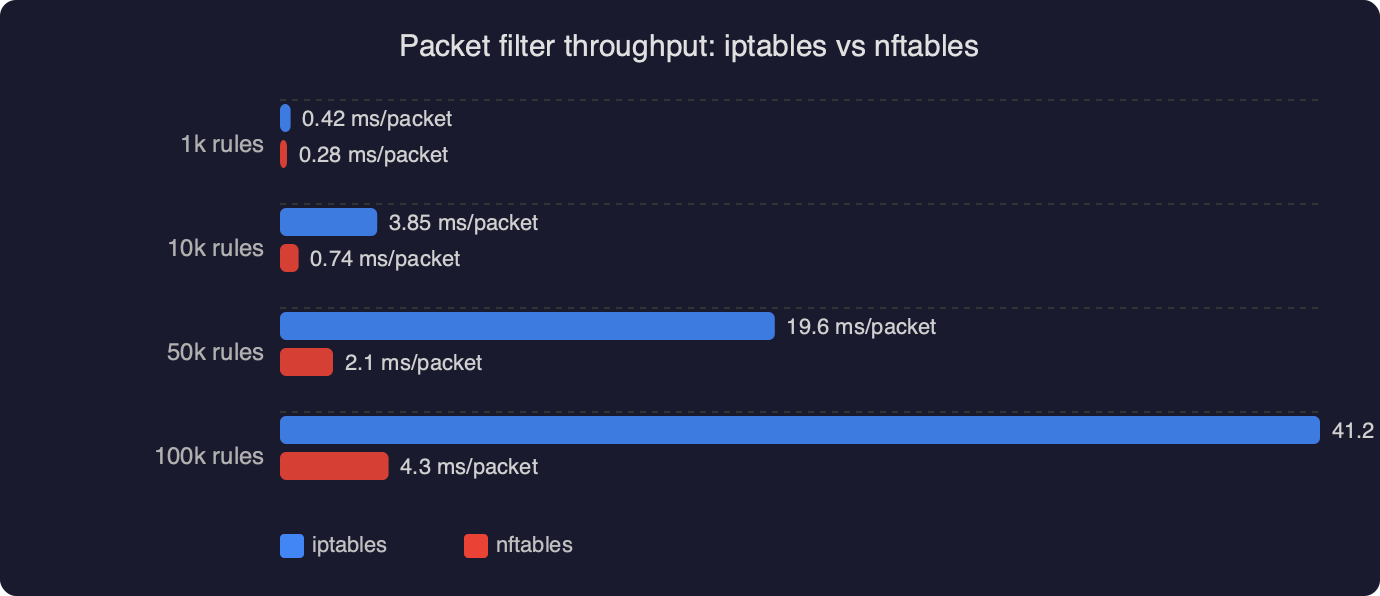
That runtime mutability is the single biggest operational win over iptables. Scripts that used to call iptables -I INPUT 1 -s 203.0.113.42 -j DROP and then worry about rule ordering can just update a set, and the kernel does an O(log n) lookup regardless of how many entries you have accumulated.
Loading and persisting the ruleset
On Debian 13 the persistent file lives at /etc/nftables.conf and the service that loads it on boot is nftables.service. The service file is provided by the nftables package and simply runs nft -f /etc/nftables.conf. Enable it, then load the ruleset manually once to make sure it parses:

sudo nft -c -f /etc/nftables.conf    # -c = check, do not load
sudo nft -f /etc/nftables.conf
sudo systemctl enable --now nftables.service
sudo systemctl status nftables.service
The -c check is the step people skip, and it is the one that catches typos before you lock yourself out. If the check passes, the load is almost always safe. If you are doing this over SSH on a remote box, open a second session first and set a sleep 60 && nft flush ruleset safety timer in the first one so you can recover from a bad policy. Cancel the timer once you have verified the new rules work.
To verify the rules are actually being hit, watch the counters. Every rule in the example above includes an explicit counter (or is preceded by one), so you can run sudo nft list ruleset and see packet and byte counts increment as traffic flows. If the tcp dport 22 counter is not moving while you are actively SSH’d in, the packets are being matched somewhere else — probably by a Docker-created chain at a higher priority — and you need to go find it.
Removing the legacy backend cleanly
Once the native ruleset has been running for long enough that you trust it — I would give it a week on a production host — you can remove the iptables compatibility layer entirely. The netfilter.org nftables project page documents the tool versions that ship with the current kernel, and on Debian 13 you want nftables 1.0.9 or later, which is what Trixie ships in the stable archive.
sudo apt purge iptables iptables-persistent
sudo apt autoremove
sudo update-alternatives --display iptables   # should error: no alternatives
If apt refuses to remove iptables because something depends on it, that something is the thing you forgot to migrate. Common offenders are fail2ban (configure it with banaction = nftables-multiport in jail.local), ufw (uninstall it — ufw on Debian 13 still drives the legacy backend and will fight your native ruleset), and older Docker builds (upgrade to a Docker version that uses iptables-nft or configure it with "iptables": false in /etc/docker/daemon.json if you are managing forwarding rules yourself).
Two things the translator will not catch
Two gotchas that bite people on the iptables to nftables Debian 13 path and that no amount of automatic translation will warn you about.
First, hook priority numbers. Classic iptables hid priorities behind table names — raw ran before mangle which ran before nat which ran before filter. In nftables you write the priority as a number (or a symbolic name like filter, which equals 0). If you translate a multi-table iptables ruleset without thinking about priorities, you can end up with two chains at the same priority on the same hook, and the order they run in becomes implementation-dependent. Always set explicit priorities on every base chain and make sure they match the original semantics.
Second, the difference between ip, ip6, and inet family tables. A rule in an ip table only sees IPv4 traffic; a rule in an inet table sees both. If you translate iptables-save and ip6tables-save output with the default translator options, you get two separate tables, which is fine but duplicated. Merging them into a single inet table is a manual step, and it is worth doing because it halves the number of places a rule can live.
The practical takeaway
The cutover is not hard, but it is unforgiving of shortcuts. Dump every backend before you start, translate with iptables-restore-translate but read the output like you would a pull request, test-load with nft -c, keep a rollback SSH session open, and do not remove the iptables package until you have watched the native counters tick up on real traffic for a week. If you do those five things, the iptables to nftables Debian 13 migration is a one-afternoon job that leaves you with a firewall policy you can actually read in a single file — which was the whole point of nftables in the first place.


