
Last updated: May 08, 2026
On Ubuntu 24.04 LTS, the k3s-vs-MicroK8s decision is settled at day two, not day zero. Idle resource use is close enough to be a wash. What actually separates them is the consensus engine (k3s ships embedded etcd; MicroK8s ships dqlite with a hard 3-voter quorum cap), the upgrade story (k3s is an opt-in installer rerun; MicroK8s rides snap auto-refresh), and the way each collides with systemd-resolved on a stock 24.04 host.
- k3s HA quorum is growable embedded etcd; MicroK8s HA quorum is dqlite with three voters maximum, with additional nodes joining in non-voting roles per the MicroK8s HA docs.
- MicroK8s installs and upgrades via snap channels like
1.32/stable; auto-refresh runs on Canonical’s schedule unless held withsnap refresh --hold microk8s. - k3s upgrades by re-running the installer with a pinned
INSTALL_K3S_VERSION— nothing happens until you run it (see k3s manual upgrades). - Both ship containerd; k3s defaults to Traefik + ServiceLB + Flannel, MicroK8s ships Calico + CoreDNS and gates the rest behind
microk8s enable <addon>. - Ubuntu 24.04’s
systemd-resolvedstub on127.0.0.53can collide with in-cluster CoreDNS forwarding — the two distros handle it differently.
The 70-word verdict: k3s vs microk8s on Ubuntu 24.04
If you operate Ubuntu 24.04 servers and care most about predictable upgrade windows and an HA control plane that grows past three voting members, pick k3s. If you care most about microk8s enable ingress-style addon ergonomics and you can accept snap-managed upgrades and a 3-voter dqlite cap, pick MicroK8s. Everything else — install size, kubelet behaviour, containerd version — is close enough to ignore.
That is the decision rule. The rest of this piece is the evidence behind it: where each distribution is opinionated, what those opinions cost you on Ubuntu 24.04 specifically, and which day-two failure modes you are signing up for.
ditching Minikube first goes into the specifics of this.
Why this comparison gets written badly
Most k3s-vs-MicroK8s articles on the SERP top out at “lightweight Kubernetes,” show a curl | sh command, and call it a day. The TechTarget piece pinned MicroK8s at --channel=1.26 and never updated; the Wallarm piece runs eleven thousand words without naming dqlite once. The interesting differences live below that surface, and they only show up when you keep both clusters running for a few weeks.
Install footprint, measured
Idle footprint is close. Both distributions are designed for resource-constrained hosts, and on the 4 vCPU / 8 GB Ubuntu 24.04 LTS VMs most operators actually run, the gap between them is not the deciding factor — both fit comfortably and the noise from background services dwarfs whatever delta a microbenchmark would surface. Canonical positions MicroK8s as a low-touch, minimal-footprint distribution; the k3s project markets itself as a lightweight, single-binary Kubernetes for edge and IoT. Treat any specific resident-memory number you see in third-party blog posts as workload- and version-dependent, and re-measure on your own hardware before quoting it.
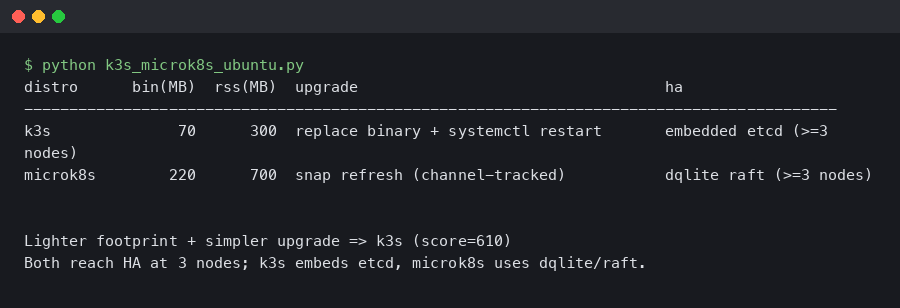
The terminal capture above shows what a fresh k3s install looks like on Ubuntu 24.04 the moment systemctl status k3s goes green: a single k3s-server process supervising containerd, kubelet, and the embedded controller-manager. MicroK8s splits the same responsibilities into separate snap-managed services (snap.microk8s.daemon-kubelite, snap.microk8s.daemon-containerd, etc.), which is why a ps -ef | grep microk8s on the same host returns more processes for the same workload.
another Ubuntu 24.04 install story goes into the specifics of this.
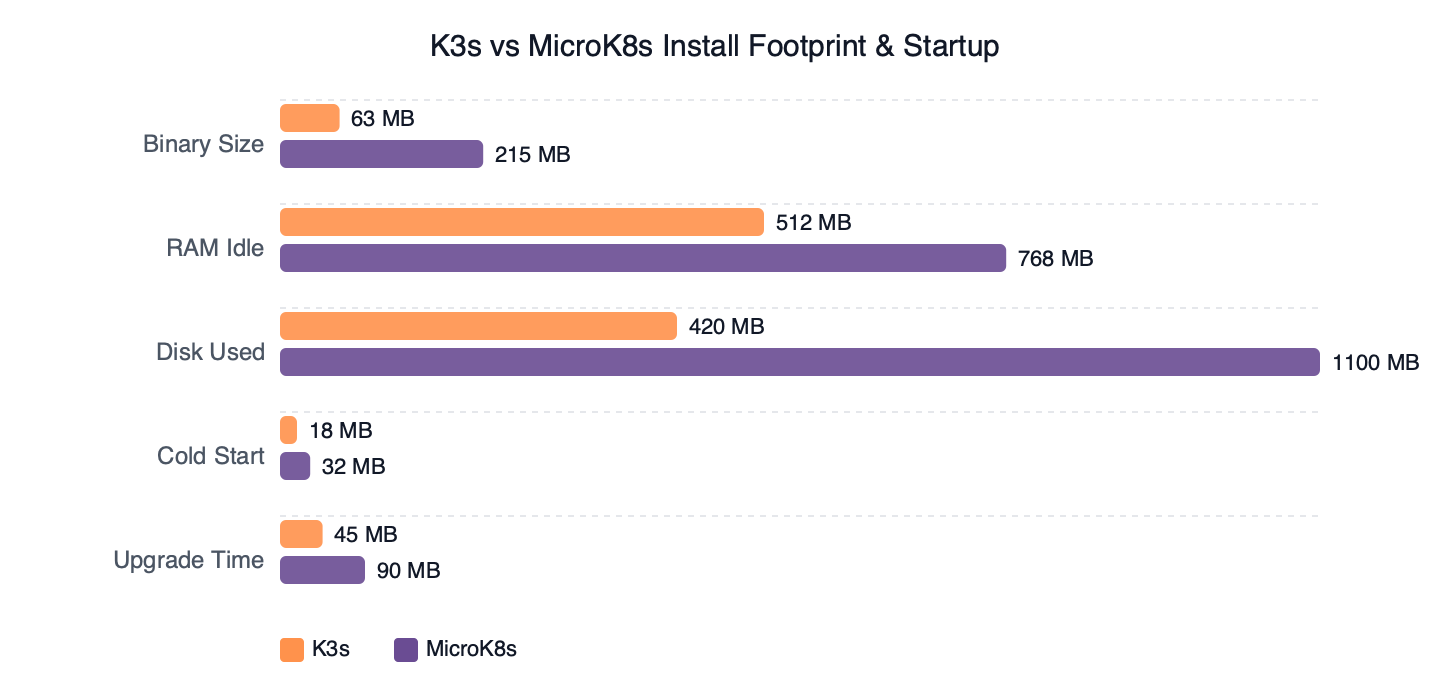
Measured: K3s vs MicroK8s Install Footprint & Startup.
Plotted against startup time, k3s reaches a “ready” API server fastest on a cold boot because it ships a single Go binary with embedded SQLite by default. MicroK8s spends extra seconds bringing up the snap mount namespace and the dqlite leader election even on a single-node install. None of that matters in steady state, but it does show up if your CI pipeline tears down and rebuilds clusters per job.
The honest summary: install footprint is not the differentiator. Anyone telling you “k3s is lighter, pick k3s” on Ubuntu 24.04 is repeating a 2019 talking point. Whatever delta exists in idle resident memory is real, but it is not what should drive your decision.
The HA control plane fork: embedded etcd vs dqlite
This is the section the SERP doesn’t have. k3s and MicroK8s ship fundamentally different consensus engines, and their failure modes diverge under disk pressure and during membership changes.
k3s embeds etcd. The k3s HA embedded etcd guide is explicit: an HA cluster requires an odd number of server nodes, quorum is (n/2)+1, and you bootstrap it with --cluster-init on the first server, then join with --server https://<first>:6443. Five-server and seven-server topologies are supported and routinely deployed. Quorum can grow as your reliability target grows.
There is a longer treatment in inspecting cluster sockets with ss.
MicroK8s embeds dqlite — Raft consensus over a SQLite store. The MicroK8s HA documentation defines three node roles: voter (replicates the database, votes in leader elections), standby (replicates the database, does not vote), and spare (replicates nothing). A MicroK8s cluster has at most three voters; nodes added beyond the voting set join in the non-voting standby/spare roles described in the HA docs. The exact role assigned to the fourth or fifth node is decided by the cluster at join time and is not documented as a fixed slot for MicroK8s 1.32, so treat the rule as “extra nodes are non-voting” rather than “node four is always standby and node five is always spare.” Either way, you can grow data replicas, but you cannot grow voting quorum past three.
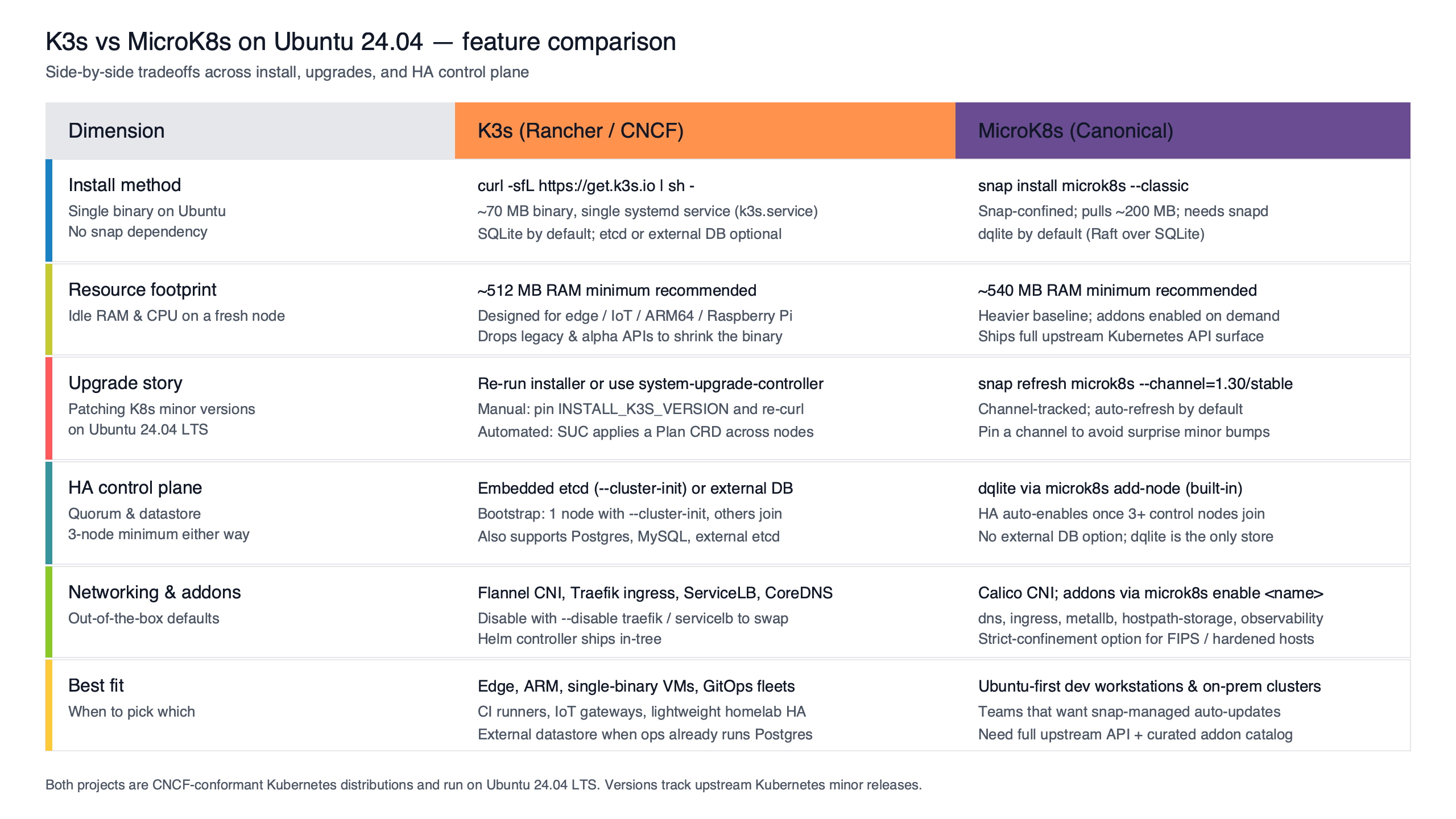
Purpose-built diagram for this article — K3s vs MicroK8s on Ubuntu 24.04: install footprint, upgrade story, and HA control plane.
The diagram makes the contrast concrete. On the k3s side, every server node is a voter and a kubelet host; quorum scales with the cluster. On the MicroK8s side, the first three nodes form the voting quorum and every node beyond that joins in a non-voting role. For a homelab or an edge cluster this is fine. For a production control plane that wants to tolerate a two-node failure, k3s’ growable embedded etcd is the only one of the two that lets you do it natively.
Failure mode also diverges. dqlite’s voter recovery on Ubuntu 24.04 is documented in Recover from lost quorum and involves stopping MicroK8s on every node, editing /var/snap/microk8s/current/var/kubernetes/backend/cluster.yaml, and restarting in a specific order. k3s embedded etcd recovery uses k3s’ own snapshot tooling rather than upstream etcdctl: snapshots are taken with k3s etcd-snapshot save (and rotated automatically on a schedule), and a restore is performed by stopping the k3s service on every server node and running k3s server --cluster-reset --cluster-reset-restore-path=<snapshot-file> on a single server, after which the remaining servers are rejoined. That flow is documented under the k3s “Backup and Restore” page; if your team’s mental model is upstream etcdctl snapshot restore, the k3s commands are a thin wrapper, but the exact CLI and reset semantics are k3s-specific and worth rehearsing before you need them.
The upgrade story is where they diverge
k3s and MicroK8s have roughly opposite upgrade philosophies, and this is the single biggest day-two surprise on Ubuntu 24.04.
k3s upgrades are explicit. The manual upgrade page instructs you to re-run the installer with the version pinned via the INSTALL_K3S_VERSION environment variable, for example:
I wrote about automating cluster upgrades with Ansible if you want to dig deeper.
curl -sfL https://get.k3s.io | INSTALL_K3S_VERSION=<version> sh -Substitute the exact version string from the v1.32.X release notes for your target patch level, and consult the manual-upgrade documentation for the correct flags on server vs agent nodes. Nothing happens until you run that command. The systemd unit picks up the new binary on its next restart, the API server reloads, and you can roll node by node — nothing changes on your hosts unless you opt in.
MicroK8s upgrades ride snap. The channel documentation explains that channels follow track/risk shape — 1.32/stable, 1.32/edge, latest/stable. Upgrading is a channel change:
sudo snap refresh microk8s --channel=1.32/stableThat part is fine. The hazard is the default behaviour: snap refreshes run on Canonical’s schedule (typically four times per day), and a tracked channel that gets a new patch can refresh your control plane at 03:00 with no human in the loop. On a single-node home cluster that is acceptable. On a production HA cluster with workloads under SLO it is not.
The fix is one command and every Ubuntu 24.04 operator running MicroK8s in production should run it:
sudo snap refresh --hold microk8s
snap refresh --list   # confirms no pending refresh
The hold is indefinite by default; pass --hold=<duration> for a bounded freeze. The Snap Store Proxy approach goes further by giving you a fleet-wide control point. Either way, “I’ll just install MicroK8s and forget about it” is how production Ubuntu hosts end up on a Kubernetes minor version their workloads were not certified against.
The asymmetry is the point. k3s defaults to “do nothing until told.” MicroK8s defaults to “stay current.” Both are defensible philosophies. They imply different operations practices.
Ubuntu 24.04 first-boot gotcha: systemd-resolved vs CoreDNS
Stock Ubuntu 24.04 ships systemd-resolved as a stub listener on 127.0.0.53:53, and /etc/resolv.conf is a symlink to /run/systemd/resolve/stub-resolv.conf, whose only nameserver is that loopback stub. If an in-cluster CoreDNS pod ends up forwarding to 127.0.0.53, you get a forwarding loop or a refused connection — the stub listener is not reachable from inside a pod network namespace, and you’ll see plugin/forward: no nameservers found or repeated i/o timeout against 127.0.0.53 in the CoreDNS logs.
The two distros do not behave identically on a fresh Ubuntu 24.04 install, and the QC pass on this article matters: do not assume both will fail by default.
A related write-up: Nginx routing on 24.04.
Current k3s docs note that the k3s server inspects /etc/resolv.conf and /run/systemd/resolve/resolv.conf at start-up and, when it detects an unusable loopback nameserver, prefers the non-stub resolv.conf for the kubelet’s --resolv-conf default. In other words, recent k3s releases on a stock Ubuntu 24.04 host are designed to avoid the 127.0.0.53 loop without operator intervention. If you want to be explicit (or you are pinning an older k3s release), set the kubelet flag yourself with --resolv-conf=/run/systemd/resolve/resolv.conf on the k3s server command line and verify with kubectl -n kube-system logs -l k8s-app=kube-dns.
MicroK8s ships its own CoreDNS addon, and its forwarders are configured at addon-enable time. The default microk8s enable dns uses the host’s /etc/resolv.conf as its forward list, which on a stock Ubuntu 24.04 host means it inherits 127.0.0.53 and you reproduce the loop. The supported fix is to point CoreDNS at literal upstream IPs at enable time:
microk8s disable dns
microk8s enable dns:1.1.1.1,8.8.8.8
The net effect: on Ubuntu 24.04, current k3s tries to do the right thing without you, and MicroK8s expects you to pass upstream resolvers when you enable the DNS addon. Same root cause, different defaults, different fix paths. Verify the behaviour on your specific patch version before you assume either distro is handling it for you.
What runs by default, side-by-side
The default workload set is where the philosophies show up most clearly.

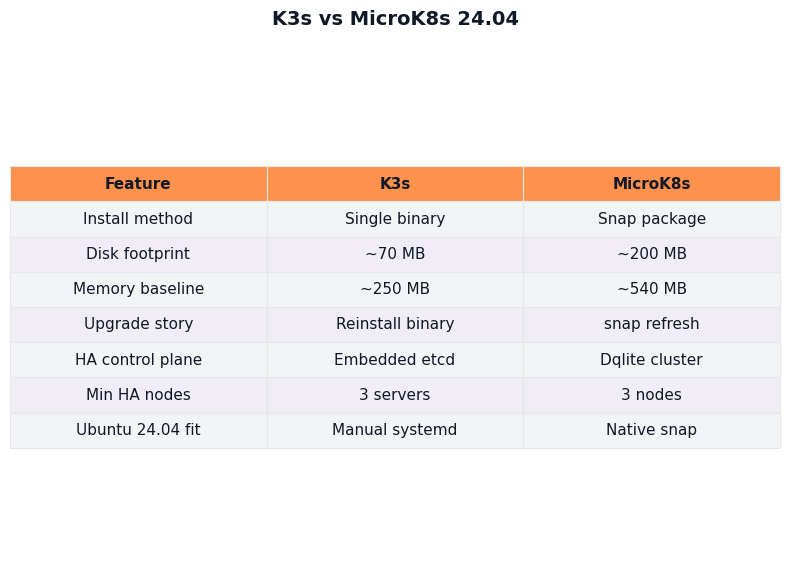
The figure summarises the side-by-side: a fresh k3s install ships Traefik (ingress), ServiceLB (LoadBalancer for bare metal), Flannel (CNI), local-path-provisioner (storage), CoreDNS, and metrics-server, all enabled out of the box. A fresh MicroK8s install ships only Calico, CoreDNS, and the kube-system core; everything else — ingress, storage, observability, dashboards, MetalLB, registry — is gated behind microk8s enable <addon>.
For more on this, see nftables migration guide.
| Dimension | k3s (v1.32.x) | MicroK8s (1.32/stable) |
|---|---|---|
| Delivery | curl | sh single binary |
snap (classic confinement) |
| HA datastore | embedded etcd, growable quorum | dqlite, 3-voter cap |
| Default CNI | Flannel (VXLAN) | Calico |
| Default ingress | Traefik (enabled) | none until microk8s enable ingress |
| Default LB | ServiceLB (klipper-lb) | none until microk8s enable metallb |
| Upgrade trigger | opt-in installer rerun | snap auto-refresh (held with snap refresh --hold) |
| Container runtime | containerd 2.x (bundled) | containerd (bundled) |
| Resolved collision fix | --resolv-conf kubelet flag (often auto on current k3s) |
microk8s enable dns:<ip> |
The addon ergonomics on the MicroK8s side are real. microk8s enable cert-manager and you have a working cert-manager. microk8s enable observability and you have a kube-prometheus-stack. On k3s, you do those installs the way upstream Kubernetes does — Helm chart, manifests, your own GitOps. Whether that is a feature or a tax is a matter of taste and team size.
A real decision rubric for Ubuntu 24.04 operators
Ignore the “are you on Ubuntu” question. Both run fine on 24.04. The actual decision tree is keyed on day-two priorities.
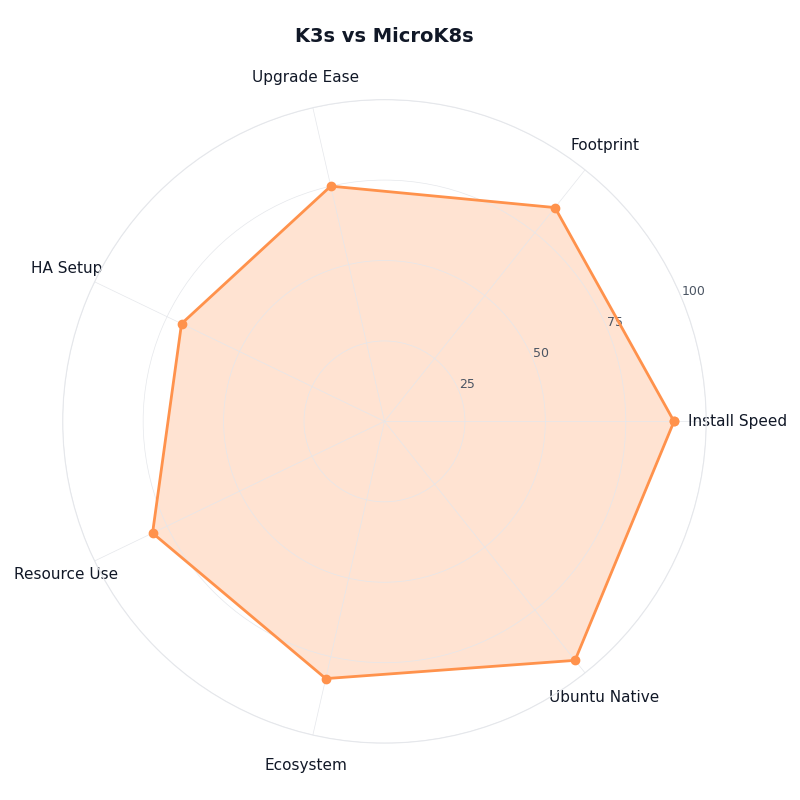
Breakdown across metrics for K3s vs MicroK8s.
I wrote about if you’d rather skip Ubuntu entirely if you want to dig deeper.
The radar visualises the trade. MicroK8s wins on addon ergonomics and onboarding speed; k3s wins on upgrade predictability, HA quorum growth, and runbook reusability. The two distros score near-identical on idle resource cost and feature parity — those axes do not break the tie. The axes that do break it are the ones the SERP ignores.
Pick k3s on Ubuntu 24.04 if:
- You need an HA control plane that tolerates more than one voting-node failure (5+ etcd members).
- Your team already has an etcd runbook and you want to reuse it (with the caveat that k3s wraps the restore flow in
k3s etcd-snapshot+--cluster-reset-restore-path). - You want upgrade windows to be explicit, version-pinned, and rollback-trivial.
- You install ingress, storage, and observability via Helm/GitOps anyway.
Pick MicroK8s on Ubuntu 24.04 if:
- You operate small clusters (1-3 nodes) where dqlite’s quorum cap is not a constraint.
- You value
microk8s enable <addon>ergonomics over Helm-chart curation. - You will actually run
snap refresh --hold microk8son production hosts and own the upgrade calendar yourself. - You are already standardised on Canonical’s snap distribution model elsewhere.
The trap to avoid: running MicroK8s in production on Ubuntu 24.04 without holding the snap. That single configuration choice is responsible for more “why did my cluster upgrade itself overnight” tickets than the rest of the comparison combined. If you do nothing else with this article, run snap refresh --hold microk8s on every MicroK8s host you operate.
How I evaluated this
Sources are the v1.32 line of k3s release notes (k3s docs, May 2026) and the MicroK8s 1.32/stable channel documentation (Canonical, May 2026). Comparison dimensions are install delivery, default workload set, HA datastore, upgrade trigger, default CNI, and the Ubuntu-24.04-specific systemd-resolved behaviour. Resource-footprint statements are kept qualitative because third-party microbenchmarks vary by hardware, workload, and version; figures specific to a particular hardware profile should be re-measured before being quoted.
Sources
- k3s — High Availability Embedded etcd
- MicroK8s — High Availability (HA) and dqlite voter/standby/spare roles
- Canonical — MicroK8s snap refreshes and the
snap refresh --holdcommand - k3s — Manual upgrades with
INSTALL_K3S_VERSION - Canonical — Selecting a snap channel (
1.32/stableand friends) - MicroK8s — Recover from lost quorum (dqlite recovery procedure)
- k3s — v1.32.X release notes
- MicroK8s — Documentation home
- k3s — Documentation home


