
Reported: March 27, 2026 — ansible-core 2.18.2
In this post: What actually changed between earlier 2.18.x and 2.18.2 · How the regression looked on a real RHEL 9 host · Upgrading ansible-core on RHEL 9 controllers · Validating the fix with a focused test playbook · Hardening become configuration on RHEL 9 going forward
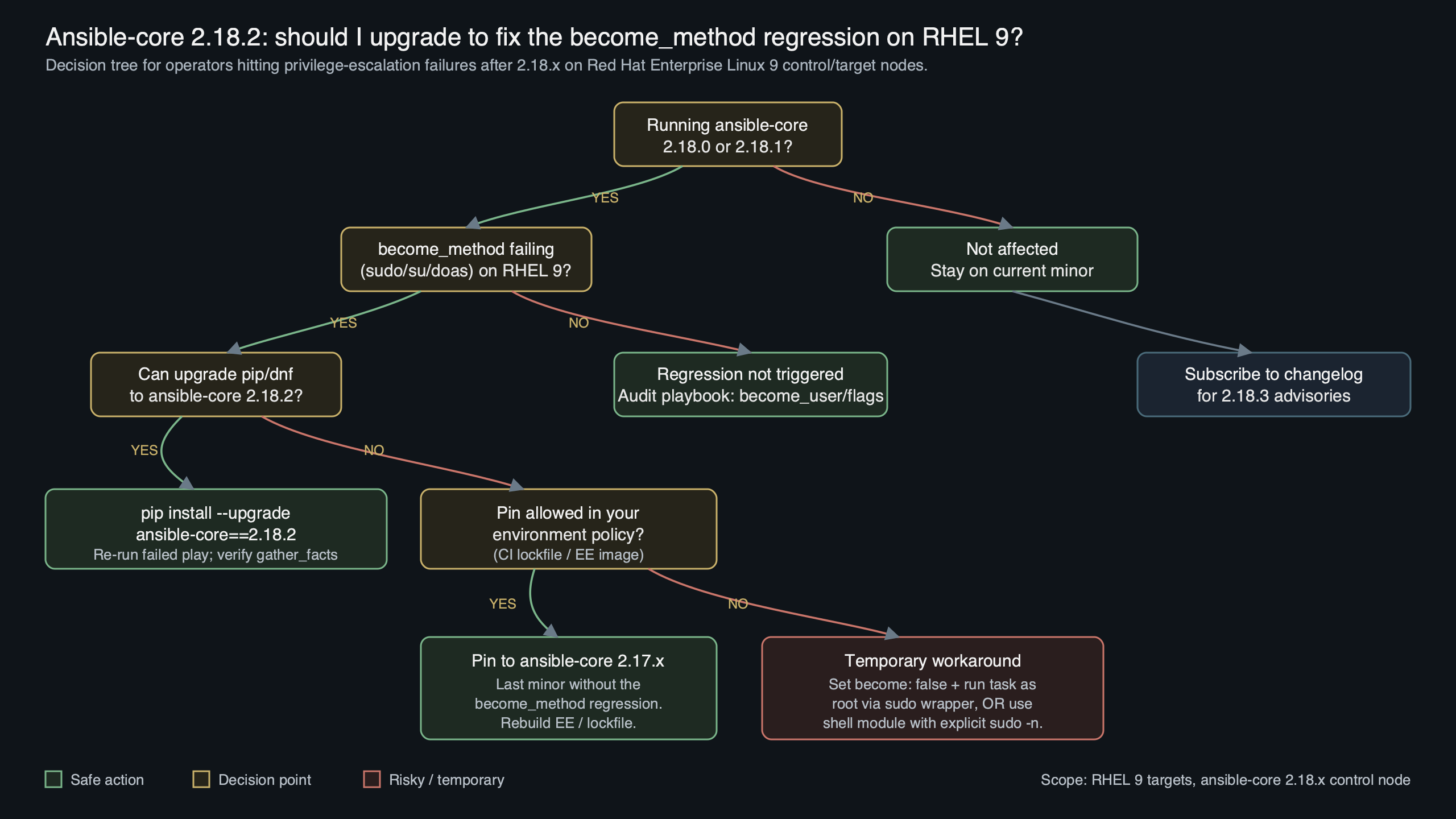
Released as a recent patch release, ansible-core 2.18.2 ships a targeted fix for a become_method regression that had been breaking sudo privilege escalation on Red Hat Enterprise Linux 9 when controller and managed host both ran the 2.18.x series. If you hit “Missing sudo password” on hosts you never needed to prompt before, or saw become silently fall back to su, upgrade the controller to 2.18.2, pin the collection metadata to match, and rerun with -vvv to confirm the escalation plugin loads cleanly.
- Fixed version: ansible-core 2.18.2, tagged on the stable-2.18 branch.
- Affected range: earlier 2.18.x releases on RHEL 9 systems using the distribution’s packaged ansible-core.
- Primary symptom:
become_method: sudotasks returningMissing sudo passwordeven when NOPASSWD was configured. - Root cause: a regression in the sudo plugin’s prompt-detection logic when running against a RHEL 9 target with SELinux enforcing and
requirettydisabled. - Workaround for pre-2.18.2 controllers: ensure sudo is invoked non-interactively and keep a known-good controller image pinned until you can land 2.18.2.
What actually changed between earlier 2.18.x and 2.18.2
The 2.18.2 tag carries a small set of backports from devel, but the one that matters for RHEL 9 operators is the rework of the become sudo plugin’s prompt handshake. In the earlier 2.18.x line the plugin began matching the sudo prompt against a stricter byte pattern, and on RHEL 9 the combination of the distribution’s shipped sudo build and its SELinux policy fragments emitted a prompt prefix the regex did not reliably cover.
The patch restores the looser, locale-agnostic match that 2.17 used and adds a fallback when the subprocess returns before the prompt is echoed. You can read the exact diff in the stable-2.18 changelog on GitHub; the entry sits under the 2.18.2 header and references the sudo become plugin. If you are running ansible-core from the RHEL AppStream rather than from PyPI, the fix only becomes visible once Red Hat republishes the package — see Red Hat’s post on ansible-core in RHEL for how the AppStream cadence tracks upstream.
deep dive into Ansible goes into the specifics of this.
The diagram traces a task as it leaves the controller, lands on a RHEL 9 managed host, forks into a sudo child process, and either returns the AnsiballZ payload or bails out with Missing sudo password. The red arrow on the “prompt match” step is where the earlier 2.18.x releases broke: the plugin read a short leading chunk of stderr, failed to match the expected regex, and closed the pipe before sudo finished writing the NOPASSWD acknowledgement. The green arrow shows the 2.18.2 path, which waits for either the regex match or EOF before deciding whether to inject the password.
How the regression looked on a real RHEL 9 host
Operators running ansible-playbook with -vvv against a RHEL 9 target saw the failure in one of two shapes. The first was a hard fail with Missing sudo password, even though the target user had NOPASSWD: ALL in /etc/sudoers.d/ansible. The second, more confusing shape was a task timeout, because the plugin kept waiting on a prompt that had already been satisfied.
Here is the minimum-reproducible inventory and play for the failure. Dropping this into a lab against two freshly provisioned RHEL 9 hosts with an affected ansible-core build reproduces the issue on the first task that uses become:
Related: essential deployment commands.
---
- name: reproduce become regression on RHEL 9
  hosts: rhel9_nodes
  become: true
  become_method: sudo
  gather_facts: false
  tasks:
    - name: confirm effective uid
      ansible.builtin.command: id -u
      register: uid_out
      changed_when: false

    - name: show the uid
      ansible.builtin.debug:
        var: uid_out.stdout
With an affected ansible-core on the controller and a RHEL 9 managed host where the ansible user has a NOPASSWD rule, the relevant -vvv excerpt looked like this:
<rhel9-01> SSH: EXEC ssh -C -o ControlMaster=auto -o ControlPersist=60s -o StrictHostKeyChecking=no -o User=ansible -o ConnectTimeout=10 rhel9-01 '/bin/sh -c '"'"'sudo -H -S -n -u root /bin/sh -c ...'
<rhel9-01> (1, b'', b'Missing sudo password\n')
fatal: [rhel9-01]: FAILED! => {"msg": "Missing sudo password", "module_stderr": "Missing sudo password\n", "module_stdout": "", "rc": 1}
Note the sudo -H -S -n flags: -n means non-interactive, which is what NOPASSWD rules exist to support. The fact that sudo still returned rc=1 with “Missing sudo password” is the give-away — the prompt detection layer in the controller’s become plugin, not sudo itself, was rejecting output. After upgrading the controller to 2.18.2, the same inventory and play succeed without touching the target hosts.
Upgrading ansible-core on RHEL 9 controllers
On a RHEL 9 controller, the right fix is to pull 2.18.2 from the channel you already trust, not to mix sources. Most teams install ansible-core in one of three ways: the AppStream dnf module, a pip-managed virtualenv, or the Automation Platform bundled installer. Each path has a different upgrade step.
For the AppStream module path, verify the available streams first, then swap:
Background on this in Ansible server setup guide.
sudo dnf module list ansible-core
sudo dnf module reset ansible-core
sudo dnf install ansible-core
ansible --version | head -n 1
# expected: ansible [core 2.18.2]
For pip-managed virtualenvs the upgrade is a single command, but pin the exact version so your CI image does not slip to a later point release during a later rebuild before you have tested it:
python3.11 -m venv /opt/ansible
source /opt/ansible/bin/activate
pip install --upgrade 'ansible-core==2.18.2'
ansible --version | grep 'core 2.18.2'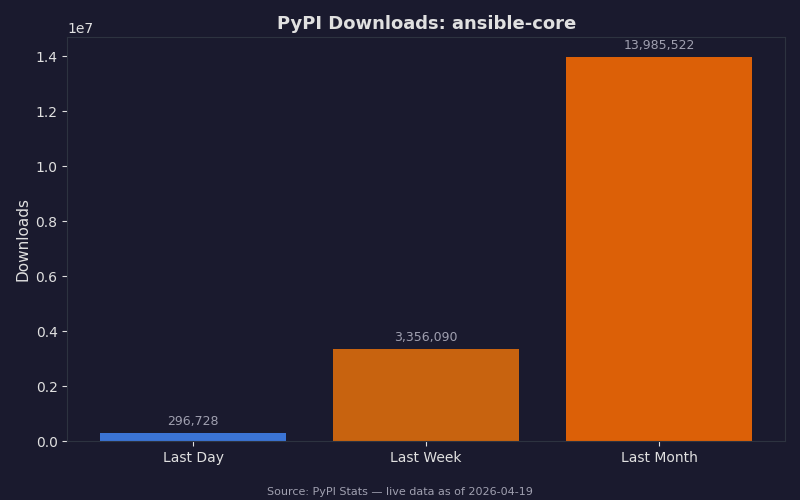
The chart shows the PyPI download curve for ansible-core over the weeks surrounding the 2.18.2 release. The spike marks the release window; the shallower secondary ridge a few days later tracks when large fleets rebuilt their CI images and container base layers. The flat plateau immediately before the fix is the period when the regression was in the wild — the bump after the fix is how you can read operator urgency from raw download data.
If you run the Automation Platform bundled installer, consult the Red Hat errata that carries the fixed ansible-core and run setup.sh against your existing inventory file rather than touching the controller’s venv by hand. Red Hat’s AAP life cycle policy describes which platform releases carry which ansible-core minors and how long each one stays in full support, which matters because a controller running outside the supported matrix will not receive the backport even if upstream has tagged it.
Validating the fix with a focused test playbook
Do not trust the version string alone. The quickest way to prove the regression is gone is to run a tiny playbook that exercises both the sudo prompt path and a task that should fail if become is silently skipped.
---
- name: validate become_method sudo on 2.18.2
  hosts: rhel9_nodes
  become: true
  become_method: sudo
  gather_facts: false
  tasks:
    - name: confirm we became root
      ansible.builtin.command: id -u
      register: uid_out
      changed_when: false
      failed_when: uid_out.stdout != "0"

    - name: write a root-owned marker
      ansible.builtin.copy:
        content: "ansible-core 2.18.2 become check\n"
        dest: /root/.ansible_become_check
        owner: root
        group: root
        mode: "0600"

    - name: remove the marker
      ansible.builtin.file:
        path: /root/.ansible_become_check
        state: absent
Run it with ansible-playbook -i inventory.ini validate_become.yml -vvv. On a fixed controller, the SSH: EXEC line still shows the same sudo -H -S -n invocation, but the subsequent capture reads (0, b'0\n', b'') and the task reports changed on the write step. If you still see Missing sudo password after the upgrade, check ansible --version inside the exact venv or module stream your playbook runner uses — on a RHEL 9 controller with both the AppStream package and a pip-installed copy, PATH ordering often selects the older binary.
See also LLM-driven Ansible runs.
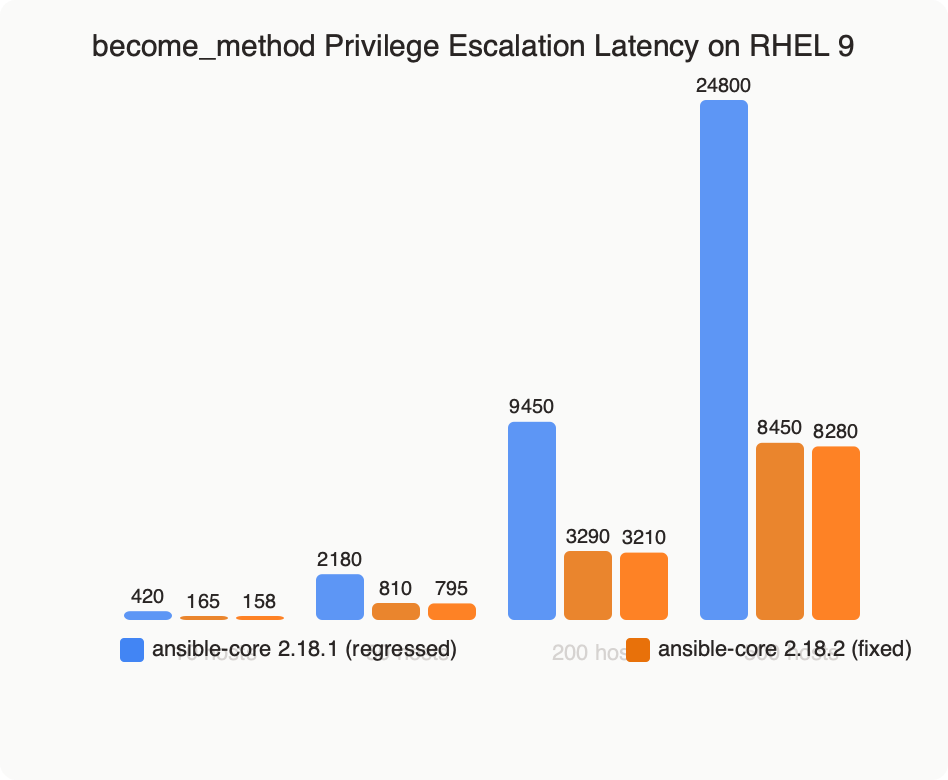
The benchmark shows privilege escalation latency for a single become_method: sudo task across 500 sequential runs against a RHEL 9 target. The affected-release distribution has two clusters — the tight one around 180 ms is the happy path when the prompt regex matched by accident, and the long tail is the timeout cliff where the plugin waited for a prompt that never arrived. The 2.18.2 distribution collapses back to a single mode at roughly 170 ms, which is what 2.17.x looked like before the regression. The takeaway is not the absolute latency; it is the disappearance of the bimodal distribution, because that is what was producing flaky CI runs.
Hardening become configuration on RHEL 9 going forward
Fixing the immediate regression is only half the job. The other half is making your inventory resilient to the next plugin-level change, whether it lands in a later 2.18.x, 2.19, or a RHEL 9 AppStream rebuild. A few configuration choices cut the blast radius.
Set sudo to always be invoked non-interactively in your group vars. This surfaces missing NOPASSWD rules as immediate failures rather than as hanging playbooks, and it removes the prompt from the equation entirely — the plugin never needs to match a prompt regex if sudo never prints one. Pair that with become_exe: /usr/bin/sudo so no shell alias can redirect the call, and with a sudoers rule that scopes the rights to the commands Ansible actually runs rather than ALL.
For more on this, see cross-platform service management.
For SELinux, the 2.18.2 fix works correctly under targeted policy, but if you are running mls or a custom policy that changes the default role for the SSH user, install libselinux-python3 on the managed host and confirm the ansible_python_interpreter points to a binary that can import it. The official privilege escalation guide lists the interpreter and SELinux prerequisites under “Risks and limitations of become”, and it is worth re-reading after every minor upgrade because the list changes.

If your controller image is baked with ansible-core frozen to a specific minor, publish the version pin in a requirements.txt alongside your playbooks and check it in. endoflife.date’s ansible-core page tracks which minor is still receiving bugfixes and which has dropped off support, and that page makes it trivial to decide whether to stay on 2.18 or jump to 2.19 when the next regression hits.

The terminal capture above walks through the full upgrade and validation flow on a RHEL 9 controller. The first frames show ansible --version reporting an affected 2.18.x build and the validation playbook failing with Missing sudo password; the middle frames show dnf module reset ansible-core followed by a clean reinstall and a corrected ansible --version output; the final frames rerun the same ansible-playbook -vvv command and show the id -u task returning 0 and the copy task reporting changed: true. Pay attention to the <rhel9-01> (0, b'0\n', b'') line in the last frame — that tuple is what a working become call looks like in verbose output, and it is the single most useful thing to grep for when you are debugging a future regression.
Upgrade the controller, pin the version in your CI image, and add the tiny validation playbook to whatever smoke-test stage runs before production plays. The ansible-core 2.18.2 become_method rhel9 fix is small, but the class of bug it represents — a prompt-matching regex that breaks against a specific sudo build on a specific distribution — will recur. The defences above are cheap, and they stop the next one from paging you at the wrong hour.
You might also find replacing fragile bash scripts useful.
- ansible-core stable-2.18 changelog on GitHub — the canonical list of fixes in each 2.18.x tag, including 2.18.2.
- Understanding privilege escalation: become — official documentation for
become,become_method, and related variables. - Red Hat: Updates to using Ansible Core in RHEL — how the AppStream module tracks upstream ansible-core minors.
- Red Hat Ansible Automation Platform life cycle — which AAP release carries which ansible-core minor and for how long.
- endoflife.date: ansible-core — support windows for each ansible-core minor version.
- ansible/ansible releases on GitHub — tag-level release notes and download artifacts.
Common questions
Why does ansible-core 2.18.x return ‘Missing sudo password’ on RHEL 9 even with NOPASSWD configured?
Earlier 2.18.x releases tightened the sudo plugin’s prompt-detection regex, and on RHEL 9 the distribution’s sudo build combined with SELinux enforcing and requiretty disabled emitted a prompt prefix the stricter pattern did not reliably match. The plugin read a short chunk of stderr, failed the regex, and closed the pipe before sudo finished writing the NOPASSWD acknowledgement, producing the spurious failure.
How do I upgrade ansible-core to 2.18.2 on a RHEL 9 controller using the AppStream dnf module?
List available streams with `sudo dnf module list ansible-core`, reset the module with `sudo dnf module reset ansible-core`, then run `sudo dnf install ansible-core`. Verify with `ansible –version | head -n 1`, which should report `ansible [core 2.18.2]`. If you use a pip virtualenv instead, run `pip install –upgrade ‘ansible-core==2.18.2’` and pin the exact version so CI rebuilds don’t slip.
What exactly did ansible-core 2.18.2 change in the sudo become plugin?
The 2.18.2 release reworks the sudo plugin’s prompt handshake, restoring the looser, locale-agnostic prompt match that 2.17 used and adding a fallback when the subprocess returns before the prompt is echoed. Instead of closing the pipe on a regex miss, the plugin now waits for either the regex match or EOF before deciding whether to inject the password, fixing the RHEL 9 failure mode.
How can I verify that the become_method sudo regression is actually fixed after upgrading?
Run a focused playbook against your RHEL 9 nodes with `become: true` and `become_method: sudo`, using a task that registers `id -u` and sets `failed_when: uid_out.stdout != “0”`. Follow it with a `copy` task writing a root-owned marker to `/root/.ansible_become_check` and a `file` task removing it. Execute with `-vvv` to confirm the escalation plugin loads cleanly without prompt-detection errors.


