
Introduction to Python in the DevOps Ecosystem
The landscape of system administration and software delivery has undergone a radical transformation over the last decade. The shift from manual server management to automated pipelines has given rise to the DevOps culture. While tools like Jenkins, Docker, and Kubernetes are the pillars of this architecture, the mortar that holds them together is often code. Specifically, Python DevOps has emerged as a critical skill set for modern engineers. While Bash Scripting and Shell Scripting remain essential for quick tasks within the Linux Terminal, Python offers the robustness, readability, and extensive library ecosystem required for complex automation, cloud infrastructure management, and system monitoring.
For a Linux System Administration professional transitioning into DevOps, Python bridges the gap between managing a single Linux Server and orchestrating thousands of containers across a Linux Cloud environment. Whether you are running Ubuntu Tutorial scripts, managing Red Hat Linux enterprise servers, or configuring CentOS and Fedora Linux nodes, Python provides a unified interface to interact with the underlying Linux Kernel. It allows for sophisticated logic that goes beyond simple command-line execution, enabling better error handling, data processing, and integration with APIs.
In this comprehensive guide, we will explore how Python serves as the ultimate tool for DevOps, covering system automation, cloud interaction, and container management. We will delve into practical code examples that demonstrate how to replace legacy scripts with robust Python applications, ensuring your infrastructure is scalable, secure, and efficient.
Section 1: System Administration and Linux Automation
At the heart of DevOps is the ability to control the operating system. Traditional Linux Administration relies heavily on tools like sed, awk, and grep. However, as logic becomes complex, Bash scripts can become difficult to maintain. Python shines here by offering standard libraries like os, sys, and subprocess that interact natively with the Linux File System and Linux Permissions.
Automating File System Management
One of the most common tasks in Linux DevOps is managing disk space, archiving logs, and ensuring correct File Permissions. In a Debian Linux or Arch Linux environment, failing to rotate logs or monitor disk usage can crash services. While you might use Linux Disk Management tools like LVM manually, Python can automate the cleanup process based on specific criteria, such as file age or size.
The following example demonstrates a Python script that functions as a maintenance bot. It scans a directory, archives old log files to save space (mimicking a backup strategy), and checks for Linux Users permissions to ensure security.
import os
import time
import shutil
import stat
import pwd

def maintain_logs(log_dir, archive_dir, days_old=7):
    """
    Archives logs older than specific days and enforces permissions.
    """
    current_time = time.time()

    # Ensure archive directory exists
    if not os.path.exists(archive_dir):
        os.makedirs(archive_dir)
        print(f"Created archive directory: {archive_dir}")

    for filename in os.listdir(log_dir):
        file_path = os.path.join(log_dir, filename)

        # Skip if it's not a file
        if not os.path.isfile(file_path):
            continue

        # Check file age
        file_age = current_time - os.path.getmtime(file_path)
        if file_age > (days_old * 86400):
            try:
                # Move to archive
                shutil.move(file_path, os.path.join(archive_dir, filename))
                print(f"Archived: {filename}")
            except Exception as e:
                print(f"Error archiving {filename}: {e}")

        # Security: Enforce Read/Write for Owner only (chmod 600)
        try:
            os.chmod(file_path, stat.S_IRUSR | stat.S_IWUSR)

            # Verify ownership (example: ensure 'sysadmin' owns it)
            file_stat = os.stat(file_path)
            owner = pwd.getpwuid(file_stat.st_uid).pw_name
            if owner != 'root' and owner != 'sysadmin':
                print(f"Warning: Suspicious ownership for {filename}: {owner}")

        except OSError as e:
            print(f"Permission error on {filename}: {e}")

if __name__ == "__main__":
    # Example usage
    LOG_PATH = "/var/log/myapp"
    ARCHIVE_PATH = "/var/log/myapp/archive"
    maintain_logs(LOG_PATH, ARCHIVE_PATH)
This script is more robust than a one-liner shell script because it handles exceptions and allows for complex logic regarding Linux Users and ownership. It touches on concepts of Linux Backup and security compliance, ensuring that sensitive logs have restricted access.
Interacting with Linux Commands
Sometimes, you need to invoke native Linux Commands like iptables for Linux Firewall management or check service status. Python’s subprocess module is the standard way to bridge Python Scripting with the shell. This is particularly useful when you need to parse the output of commands like ls, ps, or network utilities.
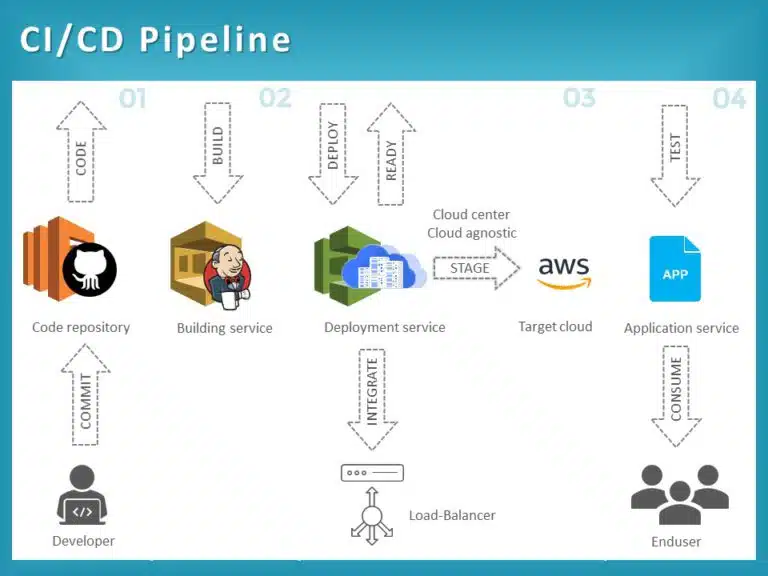
Section 2: Cloud Infrastructure and Configuration Management
Moving beyond the local server, Python Automation is the lingua franca of the cloud. Whether you are using AWS Linux instances or Azure Linux virtual machines, Python SDKs (like Boto3 for AWS) allow you to define infrastructure as code. This approach replaces manual clicking in web consoles with reproducible scripts.
Automating AWS with Boto3
In a modern DevOps environment, you might need to spin up a Linux Web Server (like Apache or Nginx) automatically when traffic spikes. Python can interact with cloud APIs to launch instances, configure Linux Networking security groups (acting as a cloud firewall), and deploy code.
Below is a practical example using Boto3 to audit running EC2 instances. This is a common task for cost optimization and security monitoring, ensuring that only authorized Linux Distributions are running.
import boto3
from botocore.exceptions import ClientError

def audit_ec2_instances(region='us-east-1'):
    """
    Lists all running EC2 instances and checks their type and state.
    """
    ec2 = boto3.client('ec2', region_name=region)

    try:
        response = ec2.describe_instances(
            Filters=[{'Name': 'instance-state-name', 'Values': ['running']}]
        )
    except ClientError as e:
        print(f"Error connecting to AWS: {e}")
        return

    print(f"--- Active Linux Instances in {region} ---")

    for reservation in response['Reservations']:
        for instance in reservation['Instances']:
            instance_id = instance['InstanceId']
            instance_type = instance['InstanceType']
            launch_time = instance['LaunchTime']

            # Extract Name tag if it exists
            name = "Unknown"
            if 'Tags' in instance:
                for tag in instance['Tags']:
                    if tag['Key'] == 'Name':
                        name = tag['Value']

            print(f"ID: {instance_id} | Name: {name} | Type: {instance_type} | Launched: {launch_time}")

            # Practical DevOps Logic: Alert on expensive instances
            if 'xlarge' in instance_type:
                print(f"ALERT: High cost instance detected: {instance_id}")

if __name__ == "__main__":
    # Ensure you have AWS credentials configured via CLI or env vars
    audit_ec2_instances()
This script demonstrates Python System Admin capabilities applied to the cloud. It allows DevOps engineers to gain visibility into their infrastructure, similar to how one might use Linux Tools to inspect a local machine.
Configuration Management Integration
Python also powers major configuration management tools. Ansible, a leading tool for Linux Automation, is written in Python. While you typically write Ansible playbooks in YAML, knowing Python allows you to write custom Ansible modules. This is essential when standard modules cannot handle specific legacy applications or complex Linux Database configurations (like specific PostgreSQL Linux tuning parameters).
Section 3: Advanced Monitoring and Containerization
The modern DevOps stack relies heavily on containers. Linux Docker and Kubernetes Linux environments abstract the underlying OS, but they still require management. While Docker Tutorial guides often focus on the CLI, Python allows for dynamic interaction with the Docker daemon.
System Monitoring with Psutil
Before diving into Docker, it is crucial to understand host performance. Tools like the top command and htop are excellent for interactive monitoring, but for automated alerting, Python’s psutil library is the industry standard. It provides an interface to retrieve information on running processes and system utilization (CPU, memory, disks, network) in a portable way.
Here is a script that acts as a custom monitoring agent. It checks for high memory usage and identifies the process consuming resources—vital for debugging memory leaks in Python Linux applications or Java services running on the server.
import psutil
import smtplib
from email.mime.text import MIMEText

def check_system_health(mem_threshold=80):
    """
    Monitors memory usage and identifies resource-heavy processes.
    """
    # Get memory details
    memory = psutil.virtual_memory()
    usage_percent = memory.percent

    print(f"Current Memory Usage: {usage_percent}%")

    if usage_percent > mem_threshold:
        print("WARNING: Memory threshold exceeded!")

        # Find top 5 memory consuming processes
        processes = []
        for proc in psutil.process_iter(['pid', 'name', 'username', 'memory_percent']):
            try:
                processes.append(proc.info)
            except (psutil.NoSuchProcess, psutil.AccessDenied):
                pass

        # Sort by memory usage
        top_procs = sorted(processes, key=lambda p: p['memory_percent'], reverse=True)[:5]

        print("Top Memory Consumers:")
        for p in top_procs:
            print(f"PID: {p['pid']} | User: {p['username']} | Name: {p['name']} | Mem: {p['memory_percent']:.2f}%")

        # In a real scenario, trigger an alert function here
        # send_alert(top_procs)

def get_disk_partitions():
    """
    Checks partitions, useful for LVM or RAID monitoring context.
    """
    print("\n--- Disk Partitions ---")
    partitions = psutil.disk_partitions()
    for p in partitions:
        print(f"Device: {p.device} | Mount: {p.mountpoint} | Fstype: {p.fstype}")

if __name__ == "__main__":
    check_system_health()
    get_disk_partitions()
This script replicates functionality found in Linux Utilities but adds the ability to programmatically react to the data. It is a foundational step toward building custom exporters for monitoring systems like Prometheus.
Orchestrating Docker with Python
Managing Container Linux environments often involves cleaning up stale resources. Using the Docker SDK for Python, you can automate the lifecycle of containers. This is more powerful than simple shell scripts because you can inspect container metadata, logs, and network settings directly as Python objects.

import docker

def clean_stale_containers():
    """
    Removes containers that exited with errors.
    """
    try:
        client = docker.from_env()

        # List all containers (stopped and running)
        containers = client.containers.list(all=True)

        print(f"Found {len(containers)} total containers.")

        for container in containers:
            # Check if container is exited
            if container.status == 'exited':
                # Inspect exit code
                exit_code = container.attrs['State']['ExitCode']

                if exit_code != 0:
                    print(f"Removing failed container: {container.name} (Exit Code: {exit_code})")
                    container.remove()
                else:
                    print(f"Container {container.name} exited gracefully. Keeping logs.")

    except docker.errors.DockerException as e:
        print(f"Error connecting to Docker daemon: {e}")
        print("Ensure the user has permissions (add to 'docker' group).")

if __name__ == "__main__":
    clean_stale_containers()
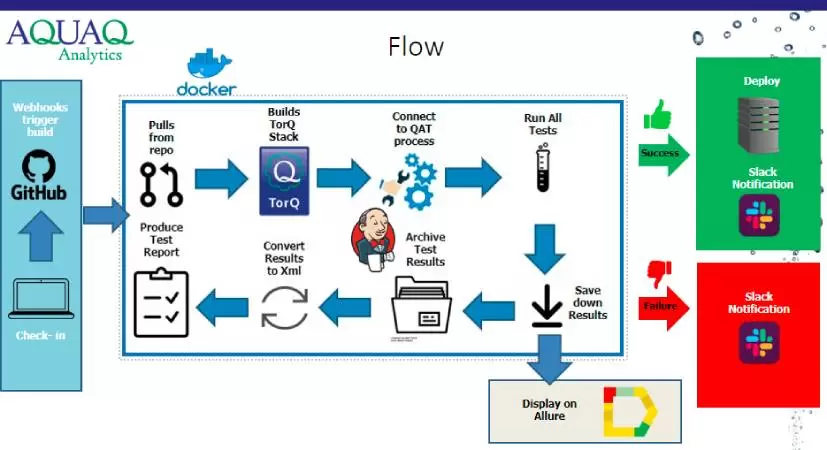
This automation is critical in CI/CD pipelines where failed builds can clutter the Linux File System with stopped containers, eventually consuming all available storage.
Section 4: Best Practices, Security, and Optimization
Writing Python for DevOps requires a different mindset than writing web applications. You are often running with elevated privileges (root), interacting with Linux Security modules like SELinux, or modifying iptables rules. Here are key best practices to follow.
Security and Permissions
When interacting with the OS, always adhere to the principle of least privilege. Avoid running Python scripts as root unless absolutely necessary. If you must perform administrative tasks, consider using sudo capabilities or configuring specific Linux Users with restricted scopes. When handling credentials (like AWS keys or database passwords for MySQL Linux instances), never hardcode them. Use environment variables or secrets management tools.
Virtual Environments and Dependencies
System Python (the version installed by default on Ubuntu or CentOS) is critical for the OS. Installing libraries globally using pip can break system utilities like yum or dnf. Always use Virtual Environments (venv) to isolate your DevOps tools. This ensures that your automation scripts have their own dependencies and do not conflict with the Linux Distributions‘ package managers.
Performance and Concurrency
For tasks involving Linux Networking or checking hundreds of servers via Linux SSH, sequential scripts are too slow. Utilize Python’s threading or asyncio libraries to perform checks in parallel. Tools like Paramiko (for SSH) can be threaded to patch multiple servers simultaneously, significantly reducing maintenance windows.
Tooling and Editors
While you can write scripts in the Vim Editor directly on the server, modern DevOps encourages developing locally and deploying via Git. Use an IDE, lint your code with pylint or flake8 to catch errors before execution, and use tools like Tmux or Screen when running long-duration scripts on remote servers to prevent session disconnection.
Conclusion
Mastering Python DevOps is a journey that transforms a reactive System Administrator into a proactive DevOps Engineer. By leveraging Python, you move beyond simple Bash Scripting and unlock the ability to orchestrate complex Linux Server environments, automate AWS Linux infrastructure, and manage Docker containers with precision.
From monitoring disk usage with shutil to auditing cloud instances with boto3 and managing processes with psutil, Python provides the toolkit necessary to build resilient systems. As you continue to learn, explore how Python integrates with Kubernetes, Ansible, and CI/CD pipelines. The combination of strong Linux Administration fundamentals and Python proficiency is the key to automating the future of infrastructure.


