
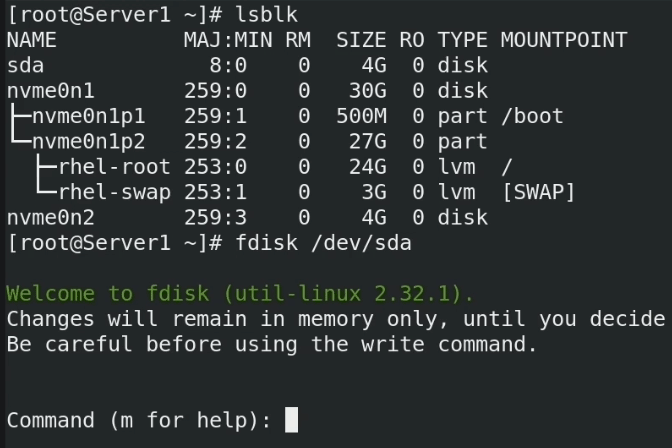
I have a confession. I’ve been managing Linux servers for nearly fifteen years, and I still get a tiny spike of adrenaline every time I type w in fdisk. You know that feeling. The “did I just wipe the production database or the empty backup drive?” panic. It doesn’t matter how many times you check lsblk; that fear is hardwired.
For a long time, disk management in Linux was purely imperative. You logged in, you identified the block device, you calculated sectors (or lazily used percentages), and you wrote the changes. If you were fancy, you wrote a Bash script to do it. If you were really fancy, you had an Ansible playbook that ran the Bash script and prayed the device nodes didn’t shift from /dev/sda to /dev/sdb after a reboot.
But recently, I’ve been messing around with the new wave of immutable operating systems—specifically Talos Linux—and the approach to storage is finally shifting. We are moving from “running commands” to “declaring state.” And honestly? It’s about time.
The “Device Node Lottery”
The biggest headache with automating Linux disk management has always been identification. On bare metal, especially with mixed hardware vendors, you never quite know what you’re getting.
I worked on a project last year where we had a fleet of servers. Half of them identified the boot drive as /dev/nvme0n1, and the other half—same model, different firmware—called it /dev/sda because of some legacy controller setting. My initialization scripts were a mess of conditional logic trying to guess which drive was which.
Here is what my “solution” looked like back then. Don’t judge me; it worked, mostly.
#!/bin/bash
# Please don't actually use this in production
TARGET_DISK=""

if [ -b "/dev/nvme0n1" ]; then
    TARGET_DISK="/dev/nvme0n1"
elif [ -b "/dev/sda" ]; then
    TARGET_DISK="/dev/sda"
else
    echo "Panic: No drive found"
    exit 1
fi

# Hope and pray we aren't formatting the USB stick we booted from
parted -s $TARGET_DISK mklabel gpt
parted -s $TARGET_DISK mkpart primary ext4 0% 100%
It’s fragile. It’s ugly. And in 2025, it feels archaic. We treat CPU and RAM as abstract resources, yet we still treat disks like physical pets we have to hand-feed.
Enter Declarative Partitioning
The philosophy behind modern tools like Talos is that you shouldn’t be SSH-ing into a box to run parted. You should define the machine’s configuration in a YAML file, boot it, and walk away.
Until recently, though, this was pretty rigid. You got the default partition layout, and if you wanted to do something fancy—like carve out a specific partition for /var/lib/longhorn or set up a separate drive for database WAL logs—you were often fighting the OS. You had to employ hacky workarounds or DaemonSets that privileged-mounted the host dev filesystem to do the dirty work after boot.
With the latest updates in the ecosystem (specifically looking at what’s happening with Talos 1.8), this is finally being solved properly. We can now define partitions, filesystems, and mounts directly in the machine config. No scripts. No guessing.
How It Looks in Practice
The magic here is the selector logic. Instead of hardcoding /dev/sdb, you match drives based on attributes that actually matter—like size, model, or bus type. This is crucial for heterogeneous clusters.
Let’s say I have a node with a small boot NVMe and a large SATA SSD that I want to use purely for local application storage. I don’t want to format it manually. I want the node to come up, see the big drive, wipe it, partition it, and mount it at /mnt/data.
In a declarative setup, the config looks something like this:
machine:
  disks:
    - deviceSelector:
        # Match any drive larger than 800GB
        size: "> 800GB"
        # Optional: ensure it's not the installation disk
        busPath: "pci-0000:04:00.0"
      partitions:
        - mountPoint: /mnt/local-storage
          size: 100%
          filesystem: xfs
          label: data-disk
  filesystems:
    - device: /dev/disk/by-partlabel/data-disk
      format: xfs
      wipe: true
Read that closely. I didn’t say “use sdb.” I said, “find the drive that’s bigger than 800GB.” If I swap hardware or if the kernel decides to enumerate devices differently, the config still holds. This is the difference between a script that breaks at 2 AM and a config that survives a hardware refresh.
Why This Matters for Kubernetes
If you’re just running a single web server, this might seem like overkill. But if you are running Kubernetes on bare metal, disk management is usually the bottleneck for automation.

I’ve spent way too many hours debugging Rook/Ceph clusters where an OSD wouldn’t start because the disk had a leftover partition table from a previous OS install. The ability to explicitly tell the OS, “I want this disk wiped and partitioned exactly like this,” before the Kubernetes layer even starts, is massive.
It also solves the “etcd latency” problem. A common best practice is to put the etcd data directory on a dedicated, high-speed disk to prevent IO wait times from crashing your control plane. Previously, automating this required custom ignition scripts or cloud-init hacks. Now? It’s just another entry in the partition list.
The “Oops” Factor
There is a downside, of course. When you automate disk wiping and partitioning via config, you remove the human “are you sure?” prompt. If you push a config that selects the wrong disk, that data is gone before you can say “restore from backup.”
I almost wiped a production backup drive last week because I was testing a new selector query. I set the size matcher to > 1TB, forgetting that my external backup drive was also 2TB. Fortunately, I caught it in the dry-run validation (always validate your configs, folks), but it was a close call.
The safety rails here are different. You aren’t relying on fdisk warning you about a mounted partition. You’re relying on the specificity of your selectors. It forces you to be extremely precise about your hardware inventory.
Final Thoughts
We are finally closing the loop on full-stack declarative infrastructure. We’ve had declarative networking and declarative container orchestration for years. Storage was the last imperative holdout, clinging to its legacy of device nodes and manual formatting.
With tools like Talos 1.8 pushing these features into the mainstream, I think the days of writing Bash scripts to format disks are numbered. And frankly, I won’t miss them. I’d rather debug a YAML file than recover a partition table any day.


