
So there I was last Tuesday, staring at a blank screen. A client specifically requested Joomla for their new e-commerce hybrid project. I usually push people toward headless setups or static site generators these days. But whatever. They wanted Joomla, they had the budget, and they needed it fast.
I spun up a fresh Ubuntu 24.04 LTS instance on DigitalOcean, installed Nginx, and figured I’d be done in twenty minutes. Well, that’s not entirely accurate — it took a bit longer than that.
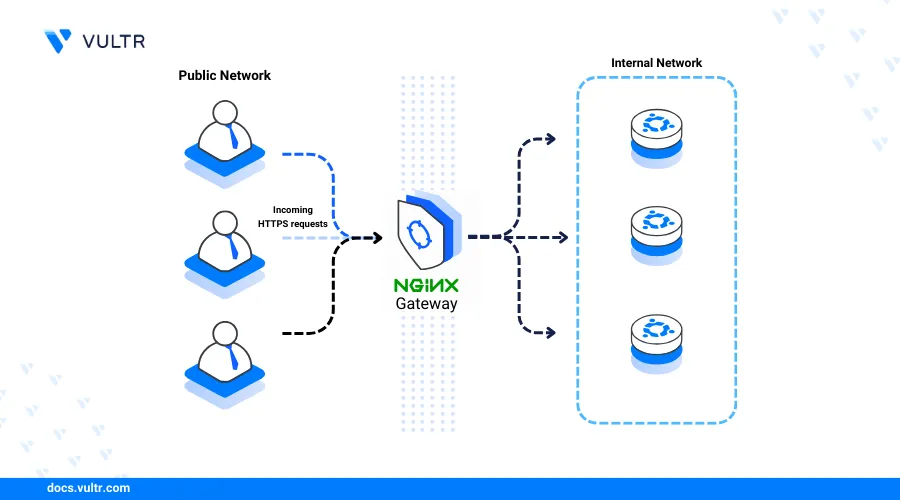
The problem is that almost every old-school PHP CMS assumes you’re running Apache. They rely heavily on .htaccess files to handle URL routing. Nginx doesn’t care about your .htaccess file. It ignores it completely. You have to translate those routing rules manually into your server block, and if you mess up one directive, the entire admin panel throws 404 errors.
Add in the fact that Ubuntu 24.04 defaults to PHP 8.3, which has gotten noticeably stricter about error reporting and socket permissions, and you’ve got a recipe for a frustrating afternoon. But I figured it out. Here is exactly how I got it running, including the config files that actually work.
The Base Stack Requirements
First, we need the LEMP stack. Drop this into your terminal:
sudo apt update
sudo apt install nginx mariadb-server php8.3-fpm php8.3-mysql php8.3-xml php8.3-zip php8.3-gd php8.3-mbstring php8.3-curl php8.3-intl -y
And don’t forget those specific PHP 8.3 modules. Miss the php8.3-xml or php8.3-intl packages and the Joomla web installer will just throw a completely unhelpful HTTP 500 error at you later.
Database Prep
Nothing special here, just standard MariaDB setup. But don’t use the root user for the application. It’s a terrible habit.
sudo mysql

CREATE DATABASE joomla_db;
CREATE USER 'joomla_user'@'localhost' IDENTIFIED BY 'your_secure_password_here';
GRANT ALL PRIVILEGES ON joomla_db.* TO 'joomla_user'@'localhost';
FLUSH PRIVILEGES;
EXIT;
The Nginx Configuration (The Actually Hard Part)
This is where most tutorials fall apart. They give you a generic PHP server block that loads the homepage but breaks the second you enable Search Engine Friendly (SEF) URLs in the Joomla dashboard.
Create a new config file for your site:
sudo nano /etc/nginx/sites-available/joomlaPaste the exact configuration I’ve provided. I’ve commented the parts that usually trip people up.
server {
    listen 80;
    server_name your_domain.com www.your_domain.com;
    root /var/www/joomla;
    index index.php index.html index.htm;

    # The magic line that replaces Apache's .htaccess routing
    location / {
        try_files $uri $uri/ /index.php?$args;
    }

    # Deny access to sensitive files
    location ~* /(images|cache|media|logs|tmp)/.*\.(php|pl|py|jsp|asp|sh|cgi)$ {
        return 403;
        error_page 403 /403_error.html;
    }

    # Pass PHP scripts to FastCGI server
    location ~ \.php$ {
        include snippets/fastcgi-php.conf;

        # Ubuntu 24.04 uses PHP 8.3 by default.
        fastcgi_pass unix:/run/php/php8.3-fpm.sock;
        fastcgi_param SCRIPT_FILENAME $document_root$fastcgi_script_name;
        include fastcgi_params;
    }

    # Caching static assets
    location ~* \.(ico|pdf|flv|jpg|jpeg|png|gif|js|css|swf)$ {
        expires 1y;
        access_log off;
    }
}
That try_files $uri $uri/ /index.php?$args; directive is doing all the heavy lifting. It tells Nginx: “If you can’t find a real file or directory matching this URL, just throw the whole request at index.php and let the application figure it out.”

Symlink it to enable the site, then test your config before restarting.
sudo ln -s /etc/nginx/sites-available/joomla /etc/nginx/sites-enabled/
sudo nginx -t
sudo systemctl restart nginx
Downloading the Files and Fixing Permissions
Grab the latest release from the official source. As of writing, I’m using the 5.x branch.

cd /tmp
wget https://downloads.joomla.org/cms/joomla5/5.0.3/Joomla_5.0.3-Stable-Full_Package.zip
sudo mkdir -p /var/www/joomla
sudo unzip Joomla_5.0.3-Stable-Full_Package.zip -d /var/www/joomla
And don’t forget the permissions. If you skip this, the installer will complain that it can’t write the configuration.php file.
sudo chown -R www-data:www-data /var/www/joomla
sudo find /var/www/joomla -type d -exec chmod 755 {} \;
sudo find /var/www/joomla -type f -exec chmod 644 {} \;
Why Bother with Nginx?
You might be wondering why I didn’t just install Apache and save myself the headache. But I actually benchmarked this setup against a standard Apache deployment on an
Questions readers ask
How do I fix Joomla SEF URLs throwing 404 errors on Nginx?
Nginx ignores Joomla’s .htaccess file, so you must translate routing rules into your server block. Add the directive `try_files $uri $uri/ /index.php?$args;` inside your `location /` block. This tells Nginx to pass any request that doesn’t match a real file or directory to index.php, letting Joomla handle the routing internally and preventing 404 errors on Search Engine Friendly URLs.
Which PHP 8.3 modules are required to install Joomla on Ubuntu 24.04?
On Ubuntu 24.04, install php8.3-fpm, php8.3-mysql, php8.3-xml, php8.3-zip, php8.3-gd, php8.3-mbstring, php8.3-curl, and php8.3-intl alongside Nginx and MariaDB. Missing php8.3-xml or php8.3-intl specifically will cause the Joomla web installer to throw an unhelpful HTTP 500 error later. Install them all in one apt command before moving on to database setup.
What file permissions does Joomla need on Ubuntu to write configuration.php?
After unzipping Joomla into /var/www/joomla, set ownership to the web server user with `sudo chown -R www-data:www-data /var/www/joomla`. Then set directories to 755 and files to 644 using `find` with `-exec chmod`. Skipping this step causes the installer to complain it cannot write the configuration.php file during setup, halting your installation partway through.
What FastCGI socket path should I use for PHP-FPM on Ubuntu 24.04?
Ubuntu 24.04 ships with PHP 8.3 by default, so the FastCGI socket lives at `/run/php/php8.3-fpm.sock`. In your Nginx `location ~ \.php$` block, set `fastcgi_pass unix:/run/php/php8.3-fpm.sock;` and include `snippets/fastcgi-php.conf` plus `fastcgi_params`. Using an older PHP version’s socket path is a common cause of PHP requests failing silently on fresh Ubuntu 24.04 servers.


